E00130-00
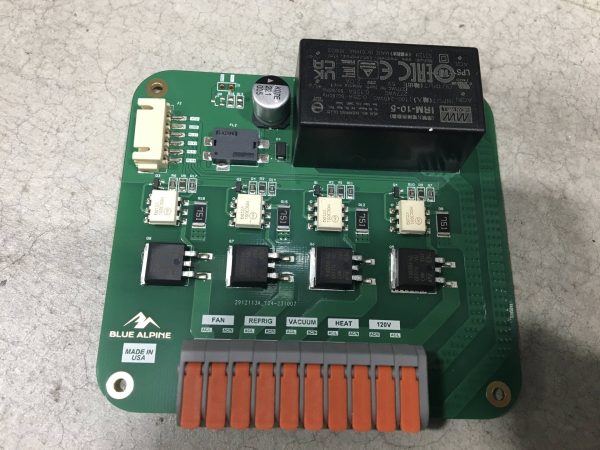
Rev 2 Power PCB Board
$74.28
Add
SKU E00107-00
In stock
One 3.5 inch touch screen, Blue Alpine part E00107-00: a bare TFT LCD touch panel with a pin header along one edge. Compare the part number and header with your old screen before you order.
This 3.5 inch touch screen is Blue Alpine part E00107-00: a TFT LCD panel with a touch layer and a pin header along one edge. It costs $42.53. It’s pictured bare, as a panel on its own without a case or bezel.
Screen sizes go corner to corner, on the diagonal. They don’t measure the width. So a 3.5 inch touch screen is quite a bit narrower than 3.5 inches from side to side. To compare with a ruler, measure the old panel’s display area from one corner to the opposite one.
LCD stands for liquid-crystal display. TFT (thin-film transistor) means every pixel has its own tiny transistor acting as a switch, which is how most small color LCDs are driven. An LCD makes no light of its own. A backlight behind the panel does that job. Wikipedia’s thin-film transistor article explains the display side in more depth.
On a 3.5 inch touch screen like this, the touch layer sits on top of the display and reports where you touch. Display and touch are separate functions, and that’s handy when troubleshooting. A blank or dim picture is one problem. A picture that looks fine but won’t respond to your finger is a different one. Note which you’ve got before you order.
Anything not lining up? Send us a picture of the back of your old 3.5 inch display before you order, and we’ll compare it.
Unplug the freeze dryer at the outlet before you remove the old 3.5 inch touch screen. Photograph how it’s mounted and connected, from a couple of angles. Then ground yourself on bare metal. Display panels are as sensitive to static as any circuit board.
The display is glass. Hold the panel by its edges, keep your thumbs off the viewing area, and never press hard in the middle to seat it. If you need to set it down, lay it face down on a clean microfiber cloth, not on a bench where grit can scratch it.
Leave the new 3.5 inch touch screen in its packaging until you’re ready to fit it. And hang on to the old panel until the new one is working. If you end up calling us, a photo of its back is useful.
This is the step to take slowly. Check that every pin is straight before you push anything home. A bent pin can fold under instead of going into its socket. It’s also easy to end up a full row or column off without noticing. Look at both ends of the header to confirm it’s centered, then press evenly along its length rather than at one end. If it feels like it’s fighting you, stop and look again.
Also in the catalog:


If the display stays blank, or shows a picture but ignores your finger, go back to the connection first. Reseat the header and look for bent or shifted pins. Then check the other end of that connection, whether it’s a cable or a board connector, for the same faults.
When a new panel behaves exactly like the old one, the screen probably wasn’t the fault. Get in touch with what you’re seeing (blank, dim, flickering, frozen, or not taking touches) and when it started. We’re on +1 (443) 514-5708, or reach us through the freeze dryer support contact page. The SAMD51 digital board and the rest of our electronics category are listed separately.