E00110-00
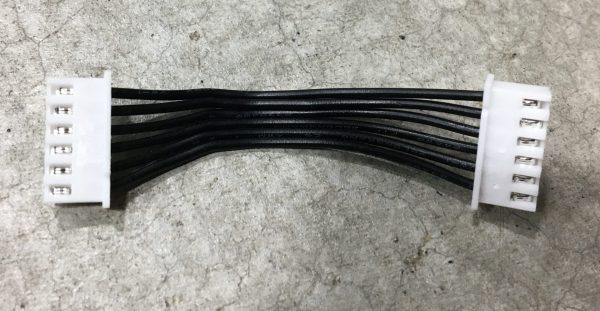
6 Pin XH Cable - 50mm length
$1.99
Add
SKU E00119-00
In stock
A square 120mm fan, 25 mm deep, supplied with a chrome wire finger guard. Blue Alpine part E00119-00, listed for the Medium Select. Check the voltage label on your old fan before you order.
This 120mm fan is a square 120 x 25mm unit with a chrome wire finger guard and wire leads. It’s Blue Alpine part E00119-00, $14.60, and it’s listed for the Medium Select. That listing is as far as our information goes. We can’t tell you where it mounts or what it cools, so this page sticks to matching it against the fan you’re replacing.
Fan sizes are quoted as frame width by depth. This one measures 120mm along each side of the square frame and 25mm front to back. That’s the usual depth for the size and the same format found in a lot of computer cases, which is why 120mm fans are so easy to come by. The computer fan article lists the standard sizes.
Measure your old fan with a ruler or calipers before ordering:
If width or depth is off, it’s a different fan. The hole spacing has to line up with whatever you’re screwing it to.
Most fans carry a sticker on the hub with the voltage and current. That label matters more than the size, because a fan on the wrong voltage either crawls or burns out. Write down what your old one says. If you can’t read it, or you want us to confirm it against this part, send a photo through the support contact form.
Wire count tells you something too. Two wires means power only. A third wire usually carries a speed signal, and a fourth adds speed control. If your old fan had more leads than you see in our photos, check with us first.
Fans push air one way only. Many have small arrows molded into the side of the frame, one for rotation and one for airflow. Before you remove the old 120mm fan, look for those arrows or take a photo showing which face points where. Fitting the new one backward is the classic mistake on a fan swap. Both faces look nearly alike, so it’s easy to do.
The chrome guard keeps fingers and loose wires out of the blades. It comes with the fan, so there’s no need to move the old one across. Put it on the same face the old guard was on. A bent guard that touches the blades will tick as they turn.


Unplug the dryer before you open anything. Photograph the old fan, its leads and the way they’re routed, so the new leads go back the same way and stay clear of the blades. Fan frames are usually plastic. Tighten the screws until they’re snug and stop there, or you’ll crack a corner or strip a hole. When you’re done, spin the blades by hand to confirm nothing catches.
Lost a screw on the way? Our fasteners and tools section lists small metric hardware by size and part number.
Noise is usually the first clue, since fan bearings wear gradually and get louder as they go. Grinding. Ticking. Blades that wobble on the hub. A fan that needs a nudge to start, or runs noticeably slower than it used to. Heavy dust on the blades also cuts airflow, so clean that off with the power disconnected before you decide the 120mm fan has failed.
A worn 120mm fan rarely recovers. Oiling a sealed bearing might quiet it for a week, but the money is better spent on a new one.
Not sure E00119-00 is the right number for your machine? Call +1 (443) 514-5708 with the part number from your manual, and we’ll check it.